Home service workflow
HomeCare
A home-service demo connecting equipment evidence with service, work, and fictional payment records.
A closer look
HomeCare is a learning app for residential service workflows. It reads Water Heater Studio history without writing to the simulator and keeps its HVAC examples clearly labeled as fictional.
Major features
At home
- Homeowner views show sample equipment readings with their source and time context.
Service work
- Service requests can move through manager assignment, appointment, inspection, estimate, and approval.
Records
- The workflow includes fictional invoices, local test payments, and SQL reporting views.
First things to try
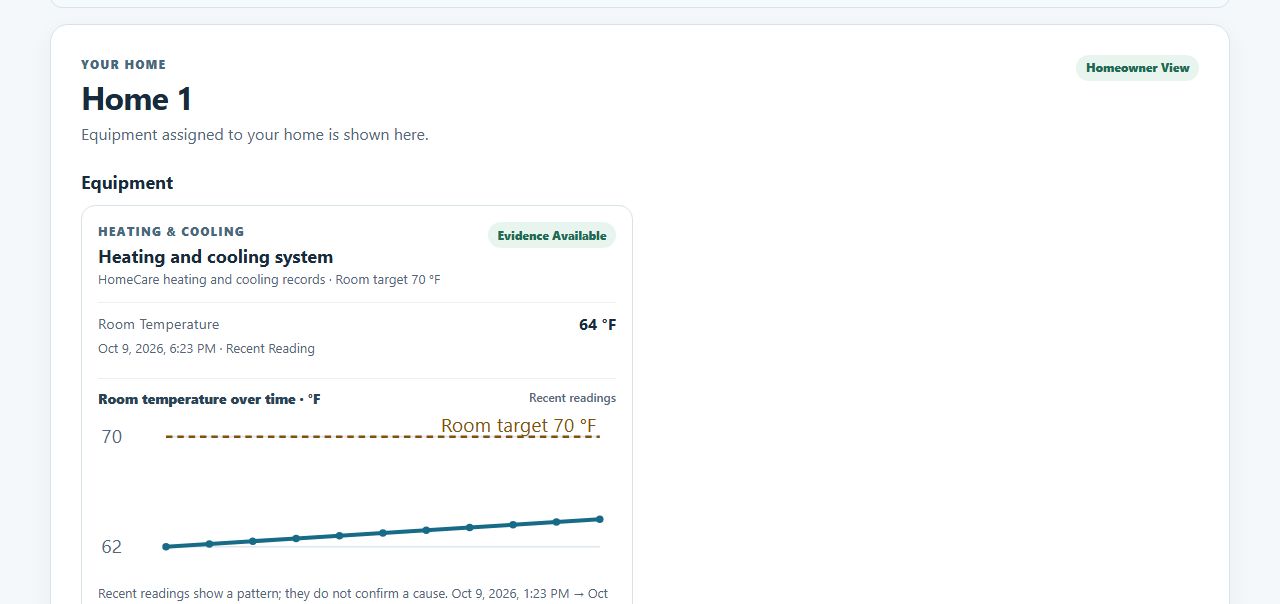
- Home 1 opens first as Homeowner 1; review its heating and cooling readings and trend.
- Choose Ask for a service visit and submit a request from the homeowner view.
- Switch View as to Service manager to assign and follow the request.
What a successful try looks like
A new request appears in the Service manager view, where it can be assigned and moved through the service workflow.
About this preview
People, equipment, service, and payments are fictional. The role selector is not authentication, the local test provider does not move money, and no real equipment is controlled. Water-heater evidence is a scoped, read-only association to fictional simulator data; older samples remain visibly marked as stale.
Live demo coming soon
The hosted version has not been published yet. The screenshot and first steps above show what it does today; the live demo will be linked here once it has been tested.